Native macOS laboratory / 0.3.0

Make the surface visible.

Inspect touch, gestures and pressure, compose haptics, and map the trackpad already under your fingers—first with public macOS tools, then with an explicitly enabled experimental layer when you choose.

Trackpad Wizard app icon
System mode by default. Enhanced Mode is session-only.
Release
0.3.0 (Build 4)
Requires
macOS 26 or later
Distribution
Signed and notarized DMG

01 / See the instrument

The hardware is already there. The missing part is a view.

Trackpad Wizard keeps the live surface, mode boundary and device target in one native workspace. Start with public AppKit input; turn on Enhanced Mode only for the raw-touch or actuator work that needs it.

Trackpad Wizard Overview showing System mode, two detected trackpads, and shortcuts to its laboratories.
Repository capture / Overview / English / Light appearance / 2026-08-30. The external device label is generic and contains no address or serial-like identifier.
Input
Contacts, gestures, pressure
Response
Haptics or keyboard mappings
Target
Built-in or external trackpad

02 / Read the surface

One surface. Six ways to understand it.

Each workspace follows a different part of the same signal—from a finger making contact to the action or tactile response that follows.

  1. 01

    Touch Lab

    Inspect contacts, resting touches, stable labels, trails, heatmaps, physical sizing, sample rate and Force Click pressure; export a session only when you choose.

    Public AppKit / optional raw contacts
  2. 02

    Gesture Studio

    Observe magnification, rotation, precision scrolling, swipes, pressure stages and gesture lifecycles in one native event stream.

    Native gesture events
  3. 03

    Haptic Composer

    Build empirical tactile phrases from timed pulses, per-step amplitude, device routing and an 8–120 Hz press-and-hold signal.

    Enhanced Mode
  4. 04

    Mappings

    Connect swipes, pinches, rotation or Force Click to a keyboard shortcut or a saved haptic pattern.

    Accessibility only for key injection
  5. 05

    Statistics

    Count successful actuator calls per locally pseudonymized trackpad, with daily history, lifetime totals and an explicit reset.

    Stored locally
  6. 06

    Devices

    Read transport, reported battery, Force Touch support, report interval, sensor size and the current macOS trackpad preferences.

    Live I/O Registry evidence

03 / Interpret motion

Keep the gesture beside the event that made it.

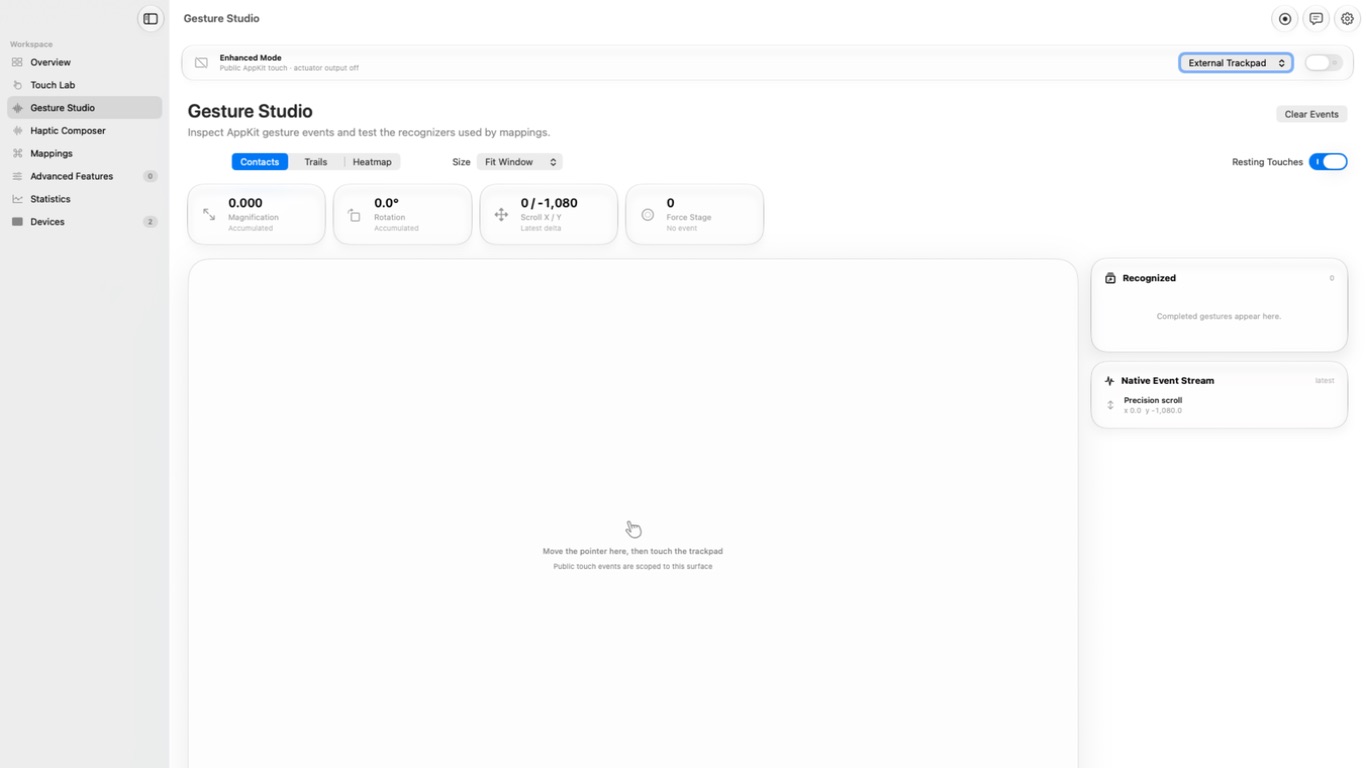
Gesture Studio places accumulated magnification, rotation, precision-scroll deltas and Force Click stage around the live touch surface. Recognized gestures remain beside the native event stream, so cause and interpretation can be inspected together.

Trackpad Wizard Gesture Studio showing gesture measurements, a touch surface, and the native event stream.
Repository capture / Gesture Studio / English / Light appearance / 2026-08-30. A precision-scroll sample appears in the native event stream.

04 / Choose the boundary

Public by default. Experimental only when invited.

The distinction is operational, not cosmetic. Experimental services load on demand, stop when Enhanced Mode stops, and are never restored automatically after launch.

A / System mode

The complete public baseline.

AppKit touch while the pointer is over the capture surface, native gesture events, Force Click stage, device diagnostics and display- calibrated sizing remain available without the private runtime.

Default after every launch

B / Enhanced Mode

A deliberate session-only layer.

One selected device can expose raw contacts and empirical actuator waveforms, amplitude, pulse frequency and routing. Advanced system changes add confirmation and automatic ten-second rollback.

Explicitly enabled / never restored on launch
  1. 01Observecontact / pressure / device
  2. 02Interpretgesture / stage / direction
  3. 03Respondmapping / haptic / export

05 / Current release

Downloadable, inspectable, and verified before macOS opens it.

Version 0.3.0 (Build 4) is distributed as a Developer ID-signed, notarized and stapled disk image. The release includes a SHA-256 checksum, and the in-app updater verifies it before installation.

Platform
macOS 26 or later
Current release
0.3.0 (Build 4) / 2026-08-31
Source
Swift 6.2+ / MPL-2.0
Update channel
GitHub Releases / manual or daily checks
Application data
Local unless explicitly exported
Accessibility
Only for shortcut injection or gesture filtering

Trackpad Wizard / Public release

A laboratory for the hardware already under your fingers.